
On this page
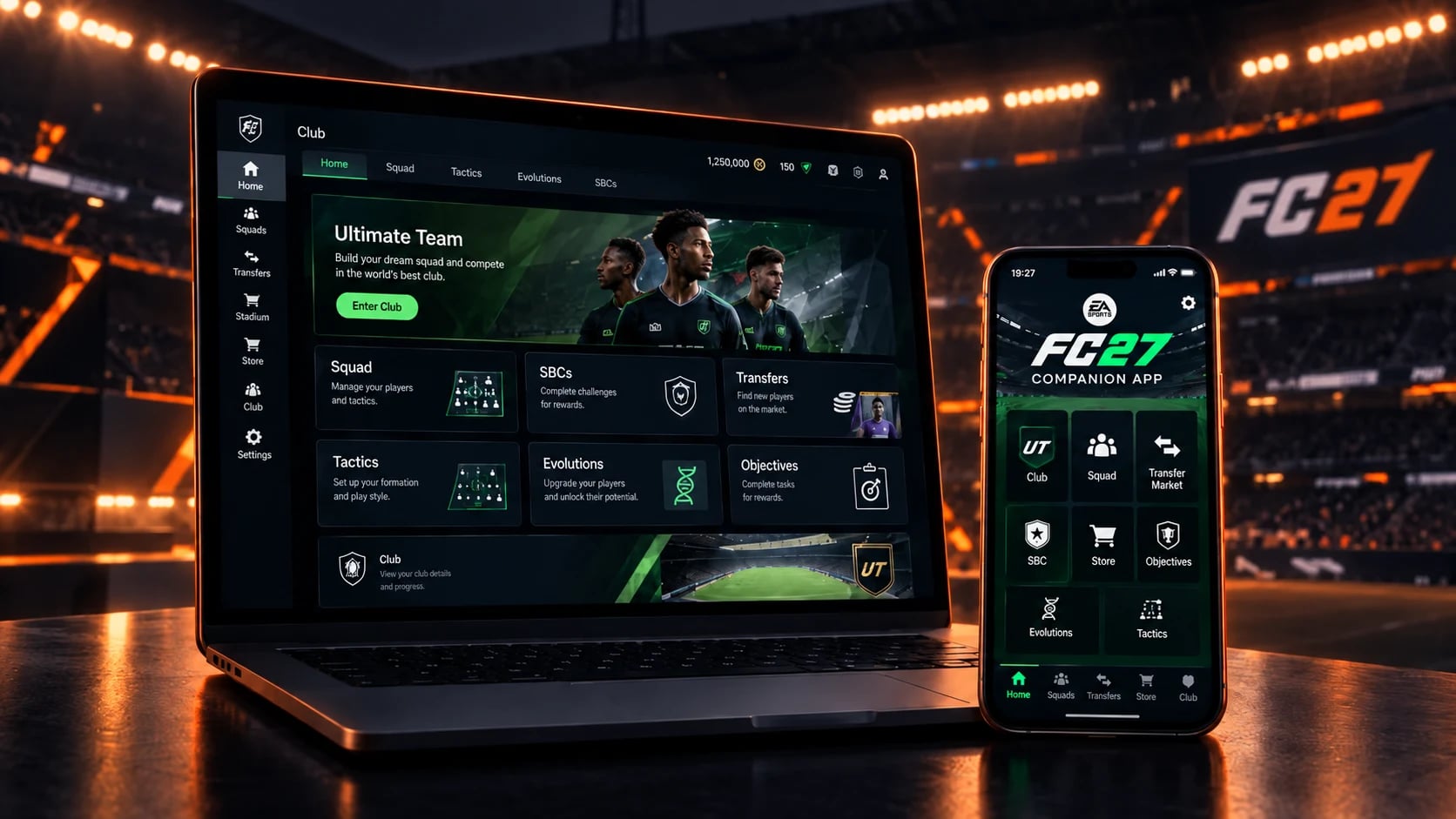
The EA SPORTS FC 27 Web App and Companion App are now available and allow you to manage your Ultimate Team club without launching the full game. The Web App is a browser-based platform for desktop, while the Companion App is its mobile version for iOS and Android.
Your FC 27 Ultimate Team season can start before you play your first match.
The Web App and Companion App let you get into your club early, check your squad, work through objectives and start preparing for the new season. But there is an important catch: having access to the apps does not necessarily mean having immediate access to the Transfer Market.
For new players, the first few days can involve objectives, active days and a little patience before everything opens up. Here is what you need to know about the FC 27 Web App and Companion App, including release dates, login requirements and Transfer Market access.
Quick facts:
Same EA Account works for both apps
You will need to log in with FC 27 on console/PC after November 7, 2026 to keep access
Transfer Market may be locked at first — see why below
The apps let you manage your club, but you cannot play matches through them
When did the FC 27 Web App and Companion App launch?
Web App launch — September 16, 2026
Companion App launch — September 17, 2026
Ultimate Edition Early Access — September 17-18, 2026
Worldwide release — September 24-25, 2026
The Web App launched on September 16, 2026, followed by the Companion App on September 17, 2026. Both apps are now available to eligible players. For both the Ultimate Edition Early Access and Worldwide launch, PC access begins at 23:00 UTC on September 17 and September 24. On other platforms, access begins at 00:00 local time on September 18 and September 25, respectively.
How to log in to the FC 27 Web App and Companion App?
Getting started with FC 27 Ultimate Team is straightforward. The Web App and Companion App offer the same core Ultimate Team management features. The main difference is how you access them: the Web App runs in a desktop browser, while the Companion App is designed for iOS and Android devices. Both options use the same EA Account associated with your FC club.
Laptop/Desktop
Open the official EA SPORTS FC Web App in your browser and sign in with the EA Account linked to your FC 27 club.
Mobile device
Download the EA SPORTS FC Companion App from the App Store or Google Play and sign in with the same EA Account.
Once logged in, your Ultimate Team club and squad will be available if your account is eligible for Web App or Companion App access.
After November 7, 2026, at 11:59 PM UTC, you must log in to Ultimate Team in FC 27 on your PC or console at least once to continue using the Web App and Companion App.
Why is my FC 27 Transfer Market locked?
Some players can access the Web App, but cannot buy or sell players through the Transfer Market. This can happen for three main reasons:
NEW PLAYER
EA's Graduated Access system allows new players to unlock the Transfer Market in-game by completing three Objective Groups in sequence:
The Journey Begins
First Team Dreams
Rising Through the Ranks
Once completed, access to the in-game Transfer Market is normally granted within 48 hours on PC or 24 hours on other platforms. However, this does not automatically unlock the Transfer Market in the Web App or Companion App. To gain access through the apps, you must follow the active-day process described below.
Here is what you need to do:
Play three full Ultimate Team matches
Log in to the Web App or Companion App on the same UTC calendar day
Repeat the process on additional days until you reach the required number of active days
Keep in mind that active days follow UTC, not your local time zone. The UTC calendar day may change at a different local time depending on your location, so make sure you complete the required matches and log in before the UTC day ends.
How long does it take to unlock the Transfer Market?
If the account is in good standing and no other Ultimate Team accounts are used on the same device, access is typically granted after two active days. If multiple Ultimate Team accounts are associated with the same device, it may require at least four active days.
These are typical timeframes, not guarantees. Playing additional matches beyond the three required in a day does not speed up the process.
Booster tip: Completing this manually takes time and consistency. If you would rather skip the grind, OGEdge can take care of the required Ultimate Team activity. You can take a look at our Transfer Market Unlock service and access it if you need help.
Do active days need to be consecutive?
These requirements are based on active days rather than a consecutive-day streak. EA does not state that missing a day resets your previous progress, so there is no need to maintain a daily streak.
How will I know when my Transfer Market access is unlocked?
Once you have completed the requirements, EA will send a message to your Ultimate Team account confirming that Transfer Market access has been unlocked. You can also check the Web App or Companion App to see if you can now buy and sell players.
RETURNING PLAYER
Returning players may receive automatic Transfer Market access when you start FC 27. To qualify, your EA Account must be in good standing and you must have previously earned Transfer Market access in FC 26 before August 1, 2026, FC 25 before August 1, 2025, or FC 24 before August 1, 2024.
If you do not meet these requirements and do not receive automatic access, you must follow the same active-day process described above to unlock the Transfer Market in the Web App or Companion App.
RESTRICTED ACCOUNT
If your account has been blocked from using the Transfer Market, EA will notify you by email and provide details about the restriction. You can also check your Penalty History to confirm whether an active restriction has been applied.
It is also important to understand how previous Transfer Market restrictions can affect your access in FC 27. A Transfer Market ban from FC 26 does not carry over to FC 27. However, you will not receive automatic Transfer Market access in FC 27 and you will need to play Ultimate Team to earn it. A franchise ban, on the other hand, carries over to FC 27 and can affect your ability to access the Transfer Market. Playing additional Ultimate Team matches will not remove an active Transfer Market restriction.
If you believe the restriction was applied incorrectly, follow these steps to challenge the decision:
Go to the Penalty History tool and sign in with your EA Account
In Your violations, find the relevant violation and select Review
On the violation details page, if the penalty is eligible for appeal, select Appeal and follow the on-screen instructions to submit the request
In short, which of the three applies to you decides what you have to do:
New player — complete the objectives, then the active days
Returning player — you may receive automatic access. If not, complete the objectives and the active days
Restricted account — check your Penalty History
What to do first in the Web App and Companion App?
Before spending your starting coins, take some time to understand what you already have. Check your available packs and starter items, review your squad and identify which positions need attention.
Next, inspect the available Squad Building Challenges and Objectives, focusing on those you can complete using items already in your club rather than spending coins straight away. If you have Transfer Market access, compare player prices before making purchases, as early-game prices can change rapidly.
Finally, start planning a balanced squad around your preferred formation and chemistry requirements.
Can you play matches through the Web App?
No. The Web App and Companion App are designed for managing Ultimate Team, not playing matches.
You will need the full game or an eligible trial to start competing in modes such as Division Rivals, Squad Battles and FUT Champions.
FC 27 Web App & Companion App: What to do next
Getting into FC 27 Ultimate Team early is not just about having the Web App or Companion App available. Their real value comes from being able to keep your club moving even when you are away from the full game.
Once your club is set up, you can use the apps to manage your squad, complete objectives and keep an eye on the Transfer Market without having to launch FC 27 every time.
The Web App and Companion App can become useful tools throughout the season, helping you stay on top of your Ultimate Team progress even when you are away from the game.
If your goal is to progress through the competitive Ultimate Team modes, explore our EA FC services and season updates.
Where to go next
EA FC 27: Prices at a glance
| Service | Best for | From |
|---|---|---|
| FUT Champions Boosting | Buy this once you have qualified and either cannot commit the hours or cannot convert them into wins. | $9.00 |
| EA FC Coins | $11.70 | |
| FUT Champs Subscription | $342.00 | |
| FUT Draft | $12.60 | |
| Gallery Tokens | $27.00 | |
| Division Rivals | Buy this for a higher division, better weekly rewards, or the qualification points that come with it. | $10.80 |
| Objective Completion | Buy this when what you want is locked behind grinding rather than skill. | $63.00 |
| Coaching | $22.50 | |
| Pro Clubs Leveling | Buy this if you play Clubs with friends and you are tired of being the one with the underpowered pro. | $9.00 |
| CO-OP | $18.00 | |
| Champs Qualification | Buy this if you hold your own in Rivals but keep falling a win or two short of qualifying. | $27.00 |
| Transfer Market Unlock | $31.50 |
Like This Guide?
Pick your game and goal in the calculator, see the full price before checkout, and talk to your booster in the order chat while the work runs.